Change orders are unavoidable on a construction project. Tracking them is where the money leaks out. When a change order never gets logged, the vendor and subcontractor bills still arrive, but there's nothing tying them to a client-approved order, so the work goes unbilled. That's the problem APARBooks solved for Elite Builders.
The challenge: unbilled change orders slipping through
Every project changes along the way, from added materials to extra labor hours. Each change sets off a chain of vendor and subcontractor bills that have to be processed and then billed back to the project owner. Without a clear way to track those change orders, invoices get lost, work goes unbilled, and cash flow tightens.
Elite Builders ran into this on a commercial office build. Partway through, the client asked to add glass partitions, which meant more materials and labor. The project manager never logged it as a change order. When the glass supplier and the subcontractor sent their invoices, Elite Builders had no record connecting that expense to a client-approved order, which put the work at risk of going unpaid and opened the door to a dispute.
The solution: real-time change order tracking in APARBooks
Elite Builders adopted APARBooks to close the gap:
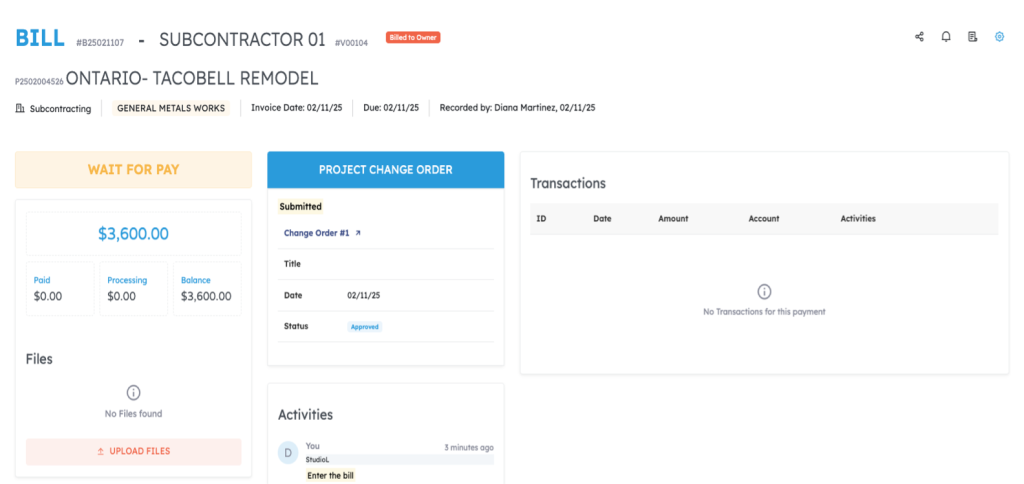
- Real-time change order tracking. Every change order sits under its project. When a vendor or subcontractor submits an invoice, APARBooks logs it and ties it to the right project and client.
- Auto-generated change order files. APARBooks creates a PDF for each new change order, ready to print or share, so the documentation is always on hand.
- Communication tools. Users can send a change order to the owner with a “Send to Owner” click, or track internal status with “Mark it Sent” and “Mark it Approved.”
- Instant snapshot of project costs. APARBooks shows a consolidated view of project costs, unbilled change orders included, so managers and accountants can see where a project stands at any moment.
The results
With APARBooks, Elite Builders spent less time on manual documentation and follow-up and put that time toward higher-priority work. Billing bottlenecks eased, payments came through faster, and cash flow improved. The team also had a clear, current picture of every change order and the project's costs, which cut the risk of an expense being overlooked.
Without that tracking, the unbilled glass partition work could have cost Elite Builders thousands in unpaid work, and a dispute with the client could have delayed completion. Instead, APARBooks turned a messy process into a manageable one and let the team bill clients accurately.
Frequently Asked Questions
What is an unbilled change order?
It's approved or in-progress change work whose vendor and subcontractor costs have been incurred but not yet billed back to the project owner. It usually happens when a change order isn't logged, so the incoming invoices have nothing to attach to.
How does APARBooks track change orders in real time?
APARBooks keeps every change order under its project. When a vendor or subcontractor invoice comes in, the system logs it and links it to the correct project and client, and it shows unbilled change orders in a consolidated project cost view.
How does APARBooks handle change order documentation?
For each new change order, APARBooks generates a PDF ready to print or share, and users can send it to the owner directly or mark it as sent or approved to track its status.
Built for Contractors. Built for Construction Accounting.
APARBooks is purpose-built construction accounting software for general contractors and bookkeepers. Manage job costing, AIA progress billing, subcontractor payments, retainage, change orders, lien compliance, and WIP reporting in one place.